
Color 101 / From photo to palette
How to choose colors from a photo without losing the subject
The most common color in an image is not always the color that makes the image memorable. Start with what you want someone to recognize.
Collect colors from three places: the subject, its setting, and a small identifying detail. Then give those colors jobs in a real layout. Sampling a photo and designing with the samples are separate decisions.
Describe the subject before opening the eyedropper
Our corgi portrait contains a large amount of grass and bright sky. An automatic palette can reasonably return several greens and pale neutrals because those colors occupy so much of the frame. That result describes the image’s area, but it may say less about the dog’s character.
Write one short sentence about what matters: a cream-and-tan corgi, framed by olive grass, with a small pink detail. This gives you a reason to keep a coat color even when the grass covers more pixels. It also stops five near-identical background greens from becoming the entire palette.
The sentence is a design brief, not an objective ranking of the photograph’s colors. If the project were about the landscape rather than the dog, a setting-led selection could be the right answer.
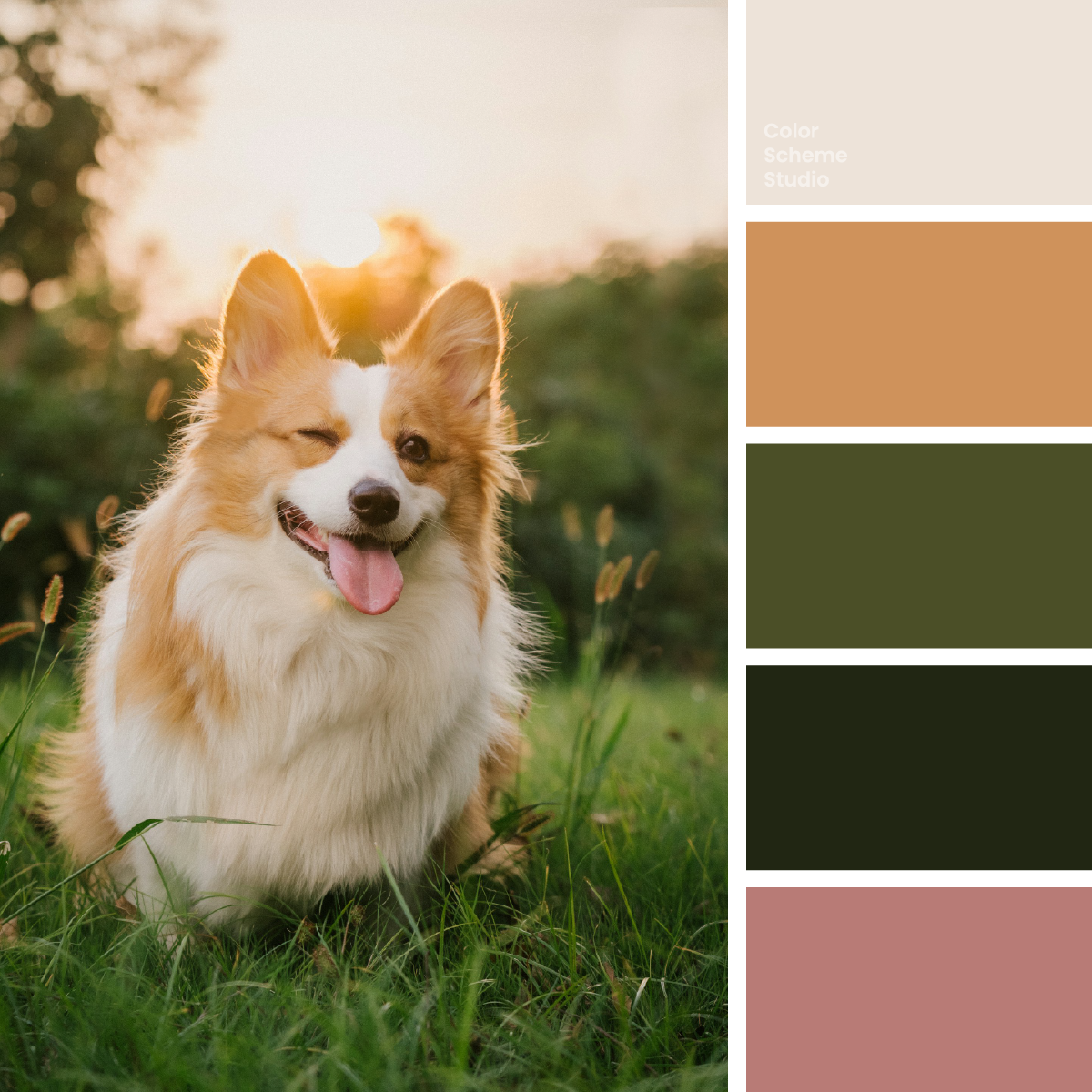
Vintage earthy color palette
See the portrait, exact values, and three practical application studies.
Explore the palette →Sample regions with a purpose
Zoom out first, then look at the subject and setting separately. Avoid choosing all five points from the same sunlit patch. A highlight, a shadow, and a middle tone on one coat can be useful, but they should not crowd out the setting if that setting is part of the story.
| Look for | In this portrait | Possible design job |
|---|---|---|
| An open light area | Oat Cream · #EDE3D9 | Reading surface and space around the photo. |
| The subject’s warm family | Sunlit Biscuit · #CF925B | A supporting shape that recalls the coat. |
| The setting | Meadow Olive · #4B4F27 | A cover field or a structural panel. |
| A dark anchor | Woodland Ink · #212613 | Names, dates, and body text on light surfaces. |
| An identifying detail | Playful Blush · #B87B76 | A restrained playful tab or mark. |
Sample several nearby points rather than trusting one pixel on a sharp edge. Edges can mix the subject with the background; a tiny highlight can be much brighter than the broader material. Keep a representative value that serves your brief, and record which part of the image led to that choice.
“Oat Cream” and the other names are our descriptive labels. The HEX values specify the chosen sRGB colors. These are useful selections from the image, not a claim that every cream area has exactly the same value.
Keep the colors, change what leads
These little portrait cards share the same message and simple graphic. Switch the surrounding surface to compare a subject-led, setting-led, or detail-led direction. The abstract circles represent a subject marker; they are not a reproduction of the photograph.
One portrait. One good memory.
Meet the companion →Subject-led: cream gives the tan marker room. The olive tab connects the card to the outdoor setting.
The detail-led version makes pink a whole surface. That can suit a playful card, but it changes the balance of the source image: a small tongue-colored note becomes the setting. The choice can be intentional without being a faithful description of the portrait.
Separate the palette from the photograph’s lighting
Golden backlight gives the corgi’s coat warmth. Sampling the brightest rim alone can produce an accent that feels more orange than the coat as a whole. Look at a broader middle tone as well, and ask which version helps your design.
Do not assume the sample is a product’s or animal’s true color under all lighting. It is the color recorded in this particular image, after its lighting, camera processing, and editing. For a project that needs an exact material match, use an appropriate physical reference or supplied specification instead of reverse-engineering it from a photograph.
Build one layout before accepting all five
- Place the actual image and words. Start with the pet’s name, one short caption, and the intended action. Let the face remain the focal point.
- Choose a reading pair. Woodland Ink on Oat Cream reaches 12.28:1. Use a checked pair before deciding whether a color is suitable for paragraphs.
- Add one supporting field. Try olive for a cover or biscuit for a sleeve. If the new field competes with the warm coat, reduce its area or move it away from the face.
- Test the smallest detail last. Pink may only need one tab. If removing it makes the layout clearer, it can stay in the reference palette without appearing in this particular application.
Review the card at its final size and on a narrow screen. Five swatches that look distinct at full size can become less useful in small labels. White on the dusty pink reaches 3.42:1; Woodland Ink on that pink reaches 4.54:1. The text decision depends on the actual foreground and background, not on how friendly the color feels.
Keep a small record you can reuse
Save the photo source, photographer, original link, and chosen HEX values together. Add a short note about which colors came from the subject, setting, and detail. This helps when the next photograph has different lighting or when a thumbnail needs to be rebuilt.
A new image of the same dog may not produce the same five values. For a continuing series, decide which colors belong to the site or brand and which can change with each photograph. Otherwise every new post can quietly replace the whole visual identity.
For the next step, see how to balance a five-color palette. Choosing meaningful colors gives you the ingredients; composition gives those ingredients a hierarchy.
References and scope
The selection workflow and card examples are Color Scheme Studio design studies. The source photograph is by Alvan Nee on Unsplash. For the separate measurable text requirement, see W3C: minimum text contrast. For screen and print color specifications, continue with our HEX, RGB & CMYK guide.